Download InvisiHire
Invisible overlay for Windows. Free to install.
Choose your platform
Windows
Windows 10 / 11 · 64-bit
Download .exe
macOS
In development
Coming soon
Keyboard shortcuts
Toggle mic on / off
Ctrl+Alt+M
Take screenshot
Ctrl+Alt+S
Send screenshot to AI
Ctrl+Alt+Enter
Previous answer
Ctrl+Alt+←
Next answer
Ctrl+Alt+→
Hide / show window
Ctrl+Shift+H
Your private AI interview assistant

Real-time answers for interviews and calls.

InvisiHire listens to the call and drafts what you could say next, from your own resume and notes. It appears on your screen, not on theirs.

Start your free sessions
10 free sessions No credit card Windows 10 & 11

For interviews, mock interviews, meetings & everyday calls.

Your usual platforms. A little more support.

Zoom Zoom
Google Meet Google Meet
Microsoft Teams Microsoft Teams
Webex Webex
HackerRank HackerRank
CoderPad CoderPad
Lark Lark
Amazon Chime Amazon Chime
How it works

Ready for your next conversation.

Add your background, open the desktop app, and join your call as usual.

01
Create your session

Choose your interview type and add your resume or notes. Give InvisiHire the background that makes answers relevant to you.

02
Open your private assistant

Launch the Windows app from your session. A small panel stays beside your call, ready when you need it.

03
Answer with confidence

InvisiHire hears the interviewer and suggests a response. Use the ideas, add your perspective, and keep the conversation moving.

Features

Built around the way
real conversations happen.

A follow-up question. A tricky coding problem. A moment to gather your thoughts. Keep the right support close by.

Stay with the conversation.

Get clear talking points while your call continues. Your private panel keeps the answer close without taking over your screen.
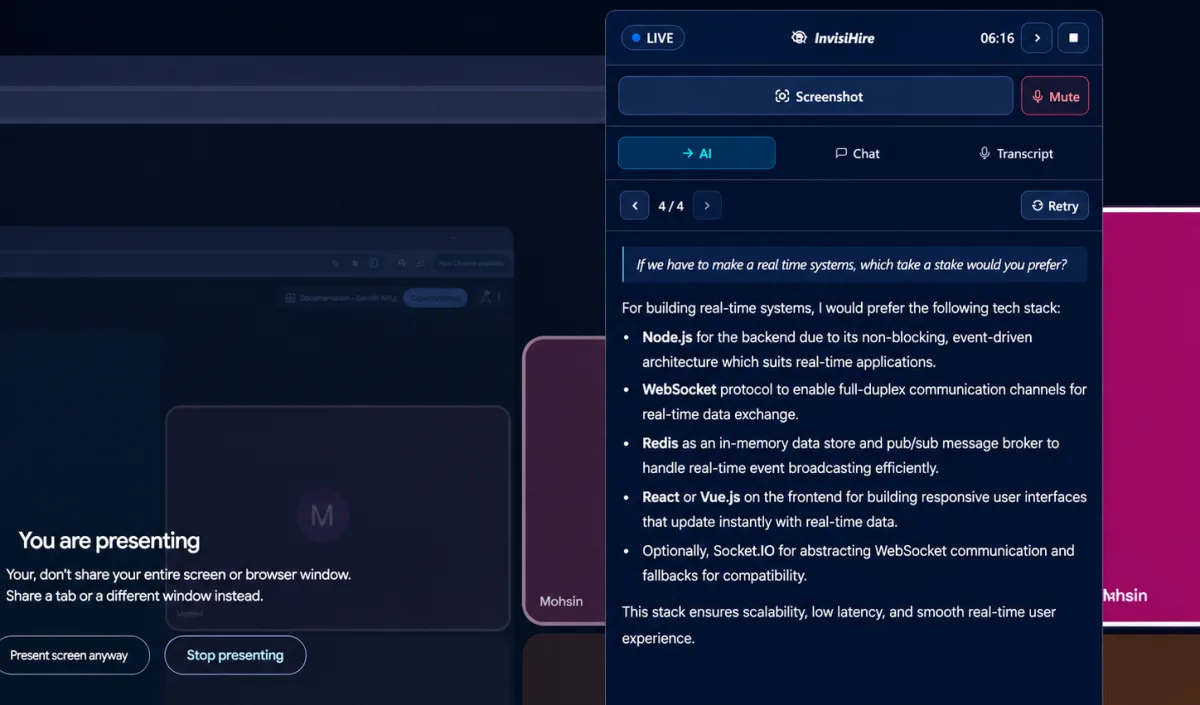
InvisiHire displaying an answer alongside a Google Meet call

From problem to a clear approach.

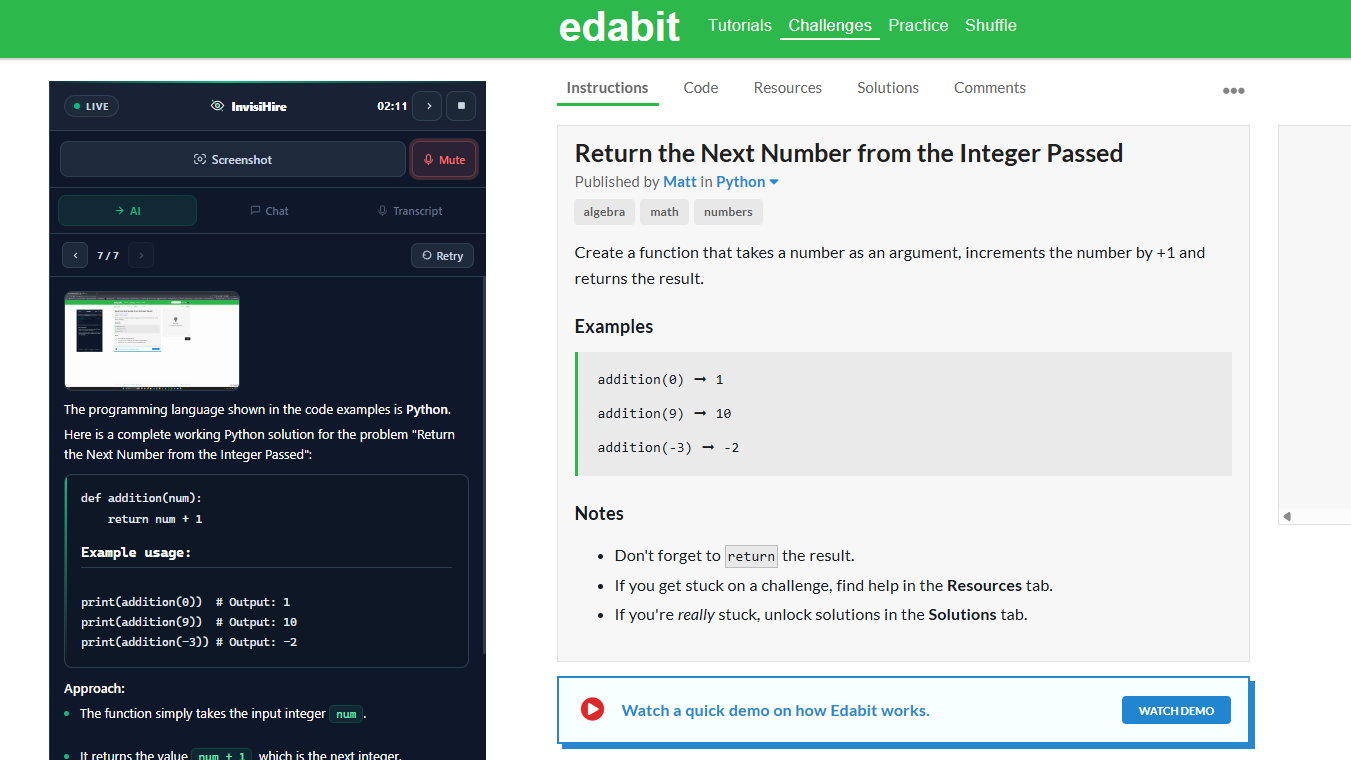
Capture the question on screen. Get a solution with working code and an explanation you can follow, all from the desktop app.
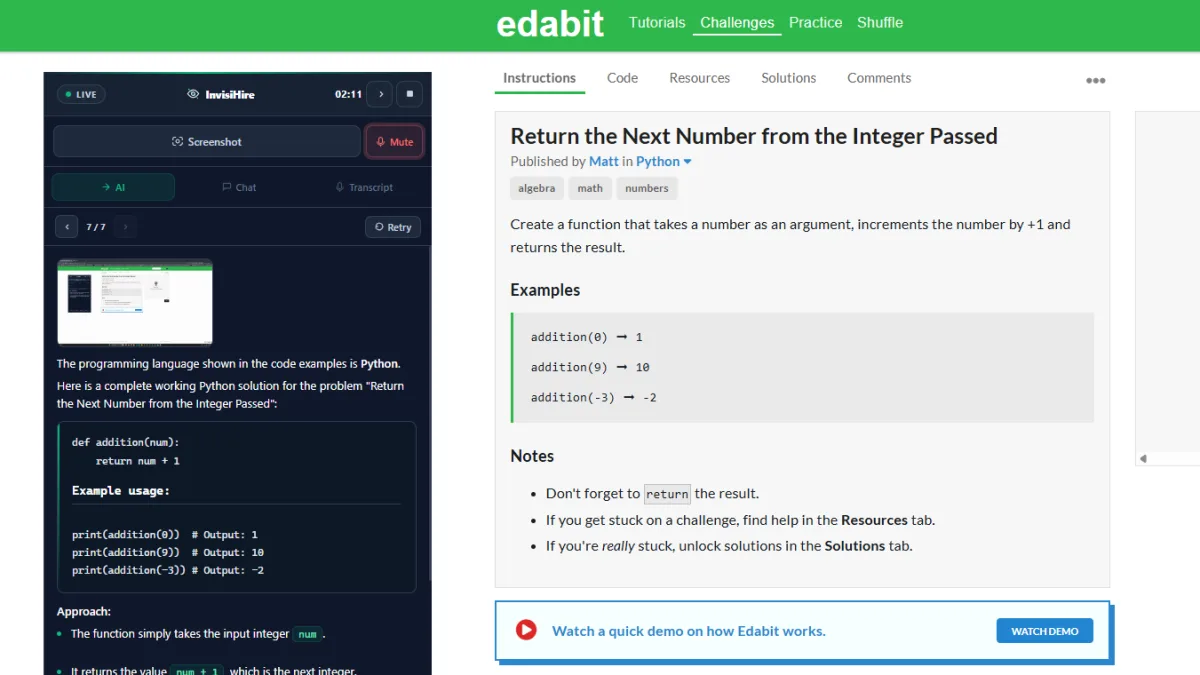
InvisiHire explaining a Python solution from a captured coding problem
Stays off the screen share

The overlay is blocked at the operating system level so it cannot appear on screenshare, recordings, or any video call platform. It stays on your side of the call.

ZoomGoogle MeetMicrosoft TeamsWebexAmazon ChimeHackerRankCoderPadLark
Real-time streaming answers

Answers start forming while the other person is still speaking. No waiting, no awkward silences.

Resume-aware answers

Upload your CV and behavioral answers draw from your real projects and experience, not generic examples.

Screenshot + Vision

Snap any coding challenge, diagram, or whiteboard. AI reads the image and responds with a full solution.

60+ languages

Use InvisiHire in more than 60 languages.

Coding interview mode

Full algorithm walkthroughs with time/space complexity and working code in Python, JavaScript, Java, Go, C++, Ruby, and more.

Choose your AI model

Pick the model that fits your session. Every currently available option is included on every plan.

Global keyboard shortcuts

Trigger mic, screenshots, and navigation without switching windows. Works even when the overlay is hidden.

Full session history

Every question and answer saved with timestamps. Review patterns after each session to improve.

invisihire · live session
LIVE · capturing audio
interviewer:
See it in action

A little clarity.
Right when you need it.

See how a technical question becomes a structured answer. Clear points help you find your direction and explain it in your own words.

  • Answers begin streaming quickly
  • Structured bullet points, not a wall of text
  • Adapts to your uploaded resume
  • Choose from all currently available models
Try it free
Pricing

Simple, honest pricing

Start free. Buy minutes when you need them, or subscribe for unlimited time.

Basic
$9 one-time
3 hrs
  • No expiry date
  • Stack multiple packs
  • Falls back when subscription ends
Get started

One payment. Your minutes have no expiry date and stack on top of any you already have.

Monthly Plan
$39 / month
Unlimited Time
  • Unlimited sessions
  • Minutes you bought stay yours if you cancel
  • Cancel any time
Get started free

While subscribed you get unlimited time. Any minutes you bought stay untouched and take over on their own when the subscription ends.

FAQ

A few things you might be wondering.

The details, before you get started.

Couldn't find what you were looking for?
Talk to us here
How do I try InvisiHire for free?
No card required. You get up to 10 free sessions, with 10 minutes in each session and a 10-minute cooldown before starting another. Just sign up and create a session.
What languages does InvisiHire support?
InvisiHire supports more than 60 languages. View the full list by starting a session and opening the language dropdown.
Can InvisiHire listen in one language and respond in another?
Yes. You pick the language the other person speaks and the language you want answers written in. They can be different, and you can change them at any time.
Does the panel show up when I share my screen?
No. The overlay is blocked at the operating system level so it cannot appear on any screenshare or recording. Your private panel is never part of what you share.
How does it hear the call audio?
You allow screen and system-audio access when Windows asks. InvisiHire captures the audio playing on your computer so it can hear the other person; it does not change your microphone or speakers, and the other person hears you as normal.
Is my audio or data stored anywhere?
Audio is never stored. It is heard in real time and then deleted right away. The questions and AI answers from each session are saved to your account so you can look back at them, and you can delete them any time.
Which AI models does it use?
You choose a model when you start a session, and every currently available model is included on every plan. We recommend GPT-5.4 Nano for most sessions. Current choices are GPT-5.4 Nano, GPT-5.6 Luna, GPT-5.4 Mini, Gemini 3.1 Flash Lite and InvisiHire Turbo. We benchmark them against real interview questions and update the list when a better option becomes available.
Does it work for coding interviews?
Yes. You get full algorithm walkthroughs with working code. You can also screenshot a coding problem and ask AI directly from the overlay.
Which desktop platforms are supported?
InvisiHire is available on Windows 10 and 11. A macOS build is in development and is not available to download yet. It works with video call and coding platforms that use audio.
Can I cancel my subscription?
Yes, from your billing page any time. You keep access until the end of the period you paid for. Any minutes you bought stay in your account with no expiry date.

InvisiHire is built for conversations where AI assistance is allowed. Sales calls, internal meetings, mock interviews, language practice, self-study. Check the rules first. If your company, school, or the person on the call says no, respect it. And if an employer asks us to stay out of their process, we honour it.

We take blocklist requests from any employer. Send your domain or the name of your hiring process to official@invisihire.com and we will block it. A real person reads every request and replies.

Request a blocklist

Your next interview.
Your best answer.

Try 10 free sessions, with 10 minutes in each. No credit card needed.

Get started free

Free tier included · Plans from $9 · Cancel any time
InvisiHire overlay active during a live Google Meet screenshare
Screenshare protected01 / 04

Your own private panel

Your private panel is never part of what you share. The overlay is blocked at the OS level, so it won't appear on screenshare, recordings, or screenshots.
  • Invisible on Zoom, Meet, Teams and Webex
  • No browser extensions needed
  • Works even while sharing your screen
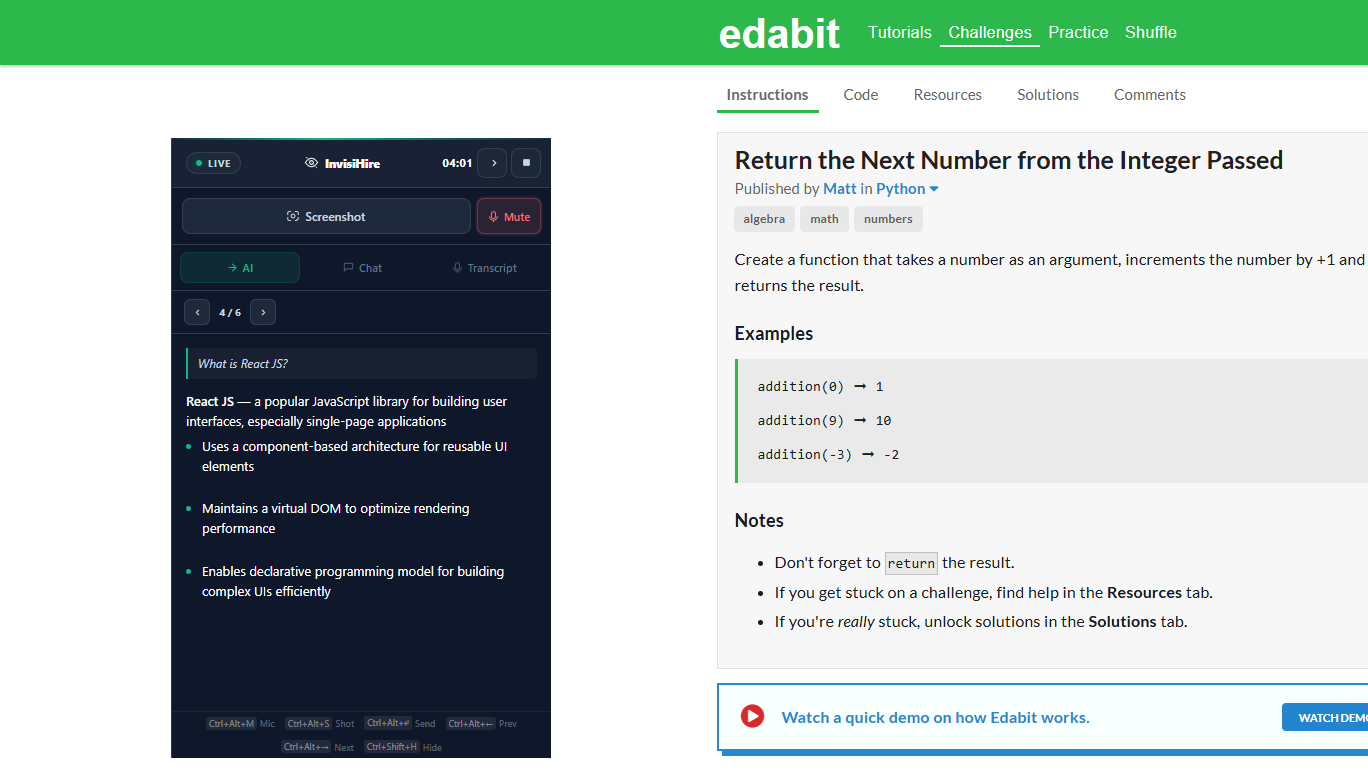
InvisiHire AI tab answering What is React JS in real time
Real-time AI02 / 04

The answer appears as the question is asked

InvisiHire listens to the question and starts typing the answer straight away. You see it on screen before you even need to speak.
  • Answer begins streaming quickly
  • Bullet points for HR questions, code for technical ones
  • Uses your resume to give personal answers
InvisiHire screenshot mode solving a Python coding challenge
Vision mode03 / 04

Take a screenshot, get the answer

Press a shortcut to snap the screen. InvisiHire reads the problem from the image and writes a full solution with explanation.
  • One key to capture and send
  • Reads text, code, and diagrams in images
  • Supports Python, JavaScript, Java, Go, C++ and more
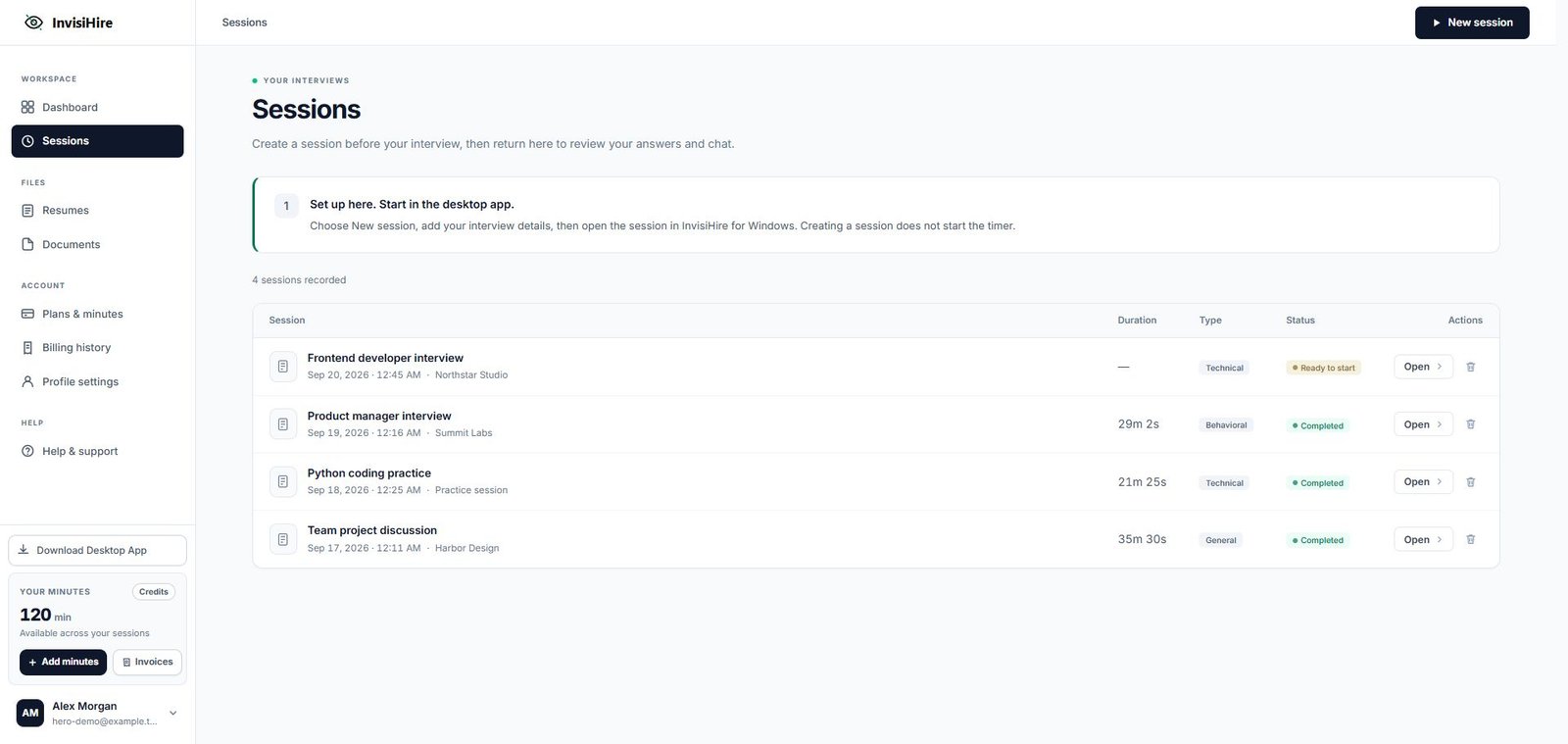
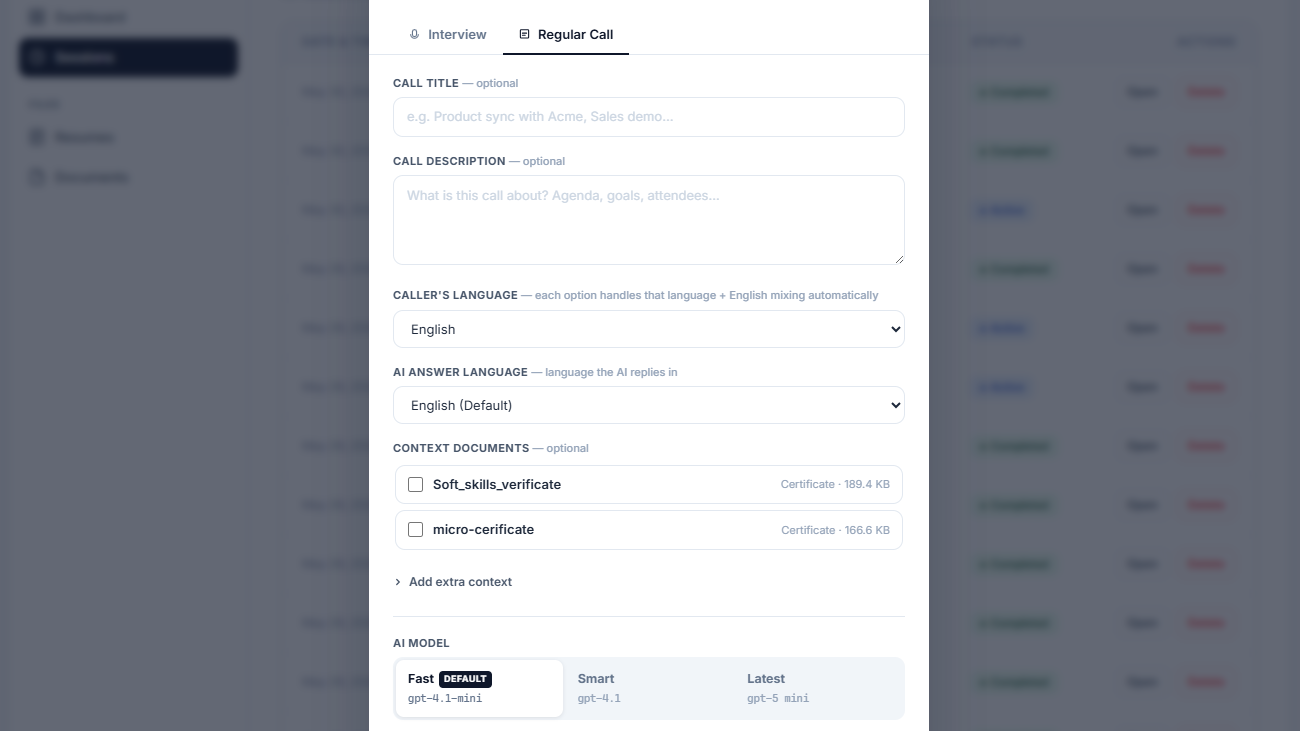
InvisiHire web dashboard new session setup form
Web dashboard04 / 04

Set up in two minutes, then just join the call

Log in, create a session, pick your interview type, and upload your resume. Then click one button to open the overlay. Done.

  • Interview, technical, or coding mode
  • 60+ languages supported
  • Resume upload makes answers personal to you